

Zabbix agent checks can work in two different modes — passive and active — and choosing the right one affects everything from firewall rules to monitoring reliability. The key difference is the connection direction: in passive mode, the Zabbix server/proxy polls the agent, while in active mode, the agent connects to the server/proxy and sends results back. In this article, we’ll break down how each mode works, when to use them (especially with NAT and restricted networks), and what to configure in the agent and in the Zabbix UI to avoid the most common setup mistakes.

Check types
Passive Zabbix agent checks (pull)
Passive checks are initiated by the Zabbix server or proxy. The server connects to the agent, requests a specific metric (CPU load, free disk, etc.), and the agent returns the value. This mode is straightforward, but it requires network reachability from server/proxy to the agent (inbound access to the agent).
Active Zabbix agent checks (push)
Active checks are initiated by the Zabbix agent. The agent connects to the Zabbix server/proxy, retrieves the list of active items, executes them locally, and periodically sends results back. Active checks are often preferred when hosts are behind NAT/firewalls (because the connection is outbound from the host) and can reduce server-side polling overhead at scale.
Configuring checks
To configure the Zabbix Agent for Active or Passive checks, modify the /etc/zabbix/zabbix_agentd.conf configuration file. Set the "Server" option to the IP address or hostname of the Zabbix Server for Passive checks, and for Active checks, set the "ServerActive" option. Note that you can configure both active and passive modes at the same time.
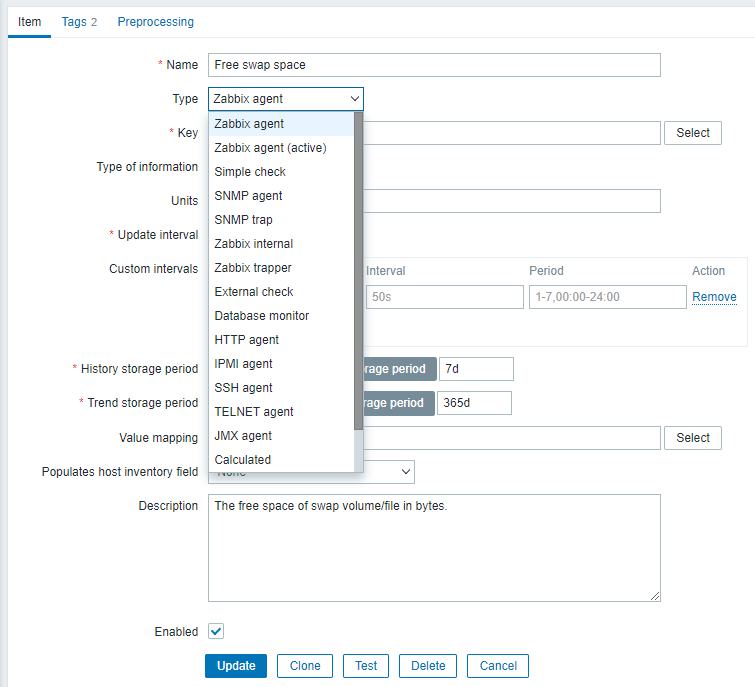
In the Zabbix web interface, you can configure the type of check for an item. Go to "Configuration" > "Hosts", select the host you want to configure, and go to the "Item" tab. Open the item and set the "Type" to either "Zabbix agent (active)" or "Zabbix agent (passive)" to specify the check type for the item.
Conclusion
Active and passive Zabbix agent checks differ mainly by who initiates the connection. With passive checks, the Zabbix server/proxy connects to the agent and polls metrics (pull). With active checks, the agent connects to the Zabbix server/proxy, fetches the list of items to collect, and sends results back (push). In practice, passive checks are simplest when your server/proxy can reach hosts directly, while active checks are often the best choice for machines behind NAT/firewalls or in segmented networks where inbound access to the agent is limited. You can also run both modes together: just configure Server and ServerActive correctly, and choose “Zabbix agent” vs “Zabbix agent (active)” per item in the UI.
FAQ: Active vs Passive Zabbix Agent Checks
- Q1: What’s the simplest way to remember the difference?
A: Passive = server polls agent (pull). Active = agent connects to server/proxy and pushes results (push). - Q2: Which ports are typically involved?
A: By default, the agent listens on TCP 10050 (used for passive polling). The server/proxy listens on TCP 10051 (used by active checks when the agent connects). - Q3: Which mode is better for hosts behind NAT or strict firewalls?
A: Active checks, because the agent makes an outbound connection to the server/proxy. Passive checks require inbound reachability from the server/proxy to the agent. - Q4: Do active checks send data only “when something changes”?
A: No. Active checks still run on configured intervals. The agent requests the list of active items, executes them, and sends results based on the item update schedule. - Q5: Can I enable both active and passive checks on the same host?
A: Yes. Configure both Server= (passive) and ServerActive= (active), then choose the item type in Zabbix: “Zabbix agent” for passive and “Zabbix agent (active)” for active. - Q6: Why do active checks often “work” but passive checks show the host as unavailable?
A: Because passive checks require inbound access to the agent (TCP 10050) from the server/proxy. Active checks can work even if inbound access is blocked. - Q7: What’s the most common active-check misconfiguration?
A: Hostname= doesn’t match the host name in the Zabbix frontend. Active checks rely heavily on the hostname identity being consistent. - Q8: Should I point Server / ServerActive to the Zabbix server or a proxy?
A: If you use a proxy for that host, point both settings to the proxy (especially ServerActive). The proxy becomes the immediate peer for the agent. - Q9: When should I prefer passive checks?
A: In simple networks where the server/proxy can reliably reach all hosts (LAN/on-prem), passive checks are straightforward and easy to reason about—especially for quick setups and troubleshooting. - Q10: What quick troubleshooting steps help most?
A: Verify:
Server= / ServerActive= point to the right server/proxy
Hostname= matches the host name in Zabbix
firewall rules allow the needed direction/port
the agent service is running and listening (for passive)
item type in UI matches the intended mode (“agent” vs “agent (active)”)



