
MariaDB is one of the most popular open-source relational database management systems. It is a fork of MySQL and is fully compatible with most applications and tools designed for MySQL. MariaDB is known for its high performance, reliability, active community support, and continuous feature updates while maintaining strong compatibility with existing projects.
MariaDB is widely used in web application development, e-commerce platforms, enterprise services, CMS systems, and any projects that require reliable storage of structured data. Thanks to its performance and ease of administration, it has become a standard solution for many modern web services.
Where MariaDB is Used
- Websites and e-commerce platforms.
- CMS platforms (WordPress, Joomla, Drupal, and others).
- CRM and ERP systems.
- Enterprise information systems.
- REST APIs and backend applications.
- User data and transaction storage.
Why Choose MariaDB
- Full compatibility with MySQL.
- High performance and optimized query engine.
- Free and open-source license.
- Support for replication, backups, and clustering.
- Compatibility with most popular CMS platforms and frameworks.
- Easy administration with a wide range of management tools.
Minimum Requirements
- 1 vCPU.
- 2 GB RAM.
- 20 GB NVMe SSD storage.
- Ubuntu 22.04 or Ubuntu 24.04.
Important: by default, MariaDB uses the following network port:
- 3306/TCP — client and application connections.
Installing MariaDB via the Serverspace Panel
The easiest way to deploy MariaDB is by using the One-Click Apps catalog in the :contentReference[oaicite:0]{index=0} control panel. The system automatically creates a virtual machine, installs the database server, and performs initial configuration without requiring manual command execution.
Step 1. Create a new cloud server
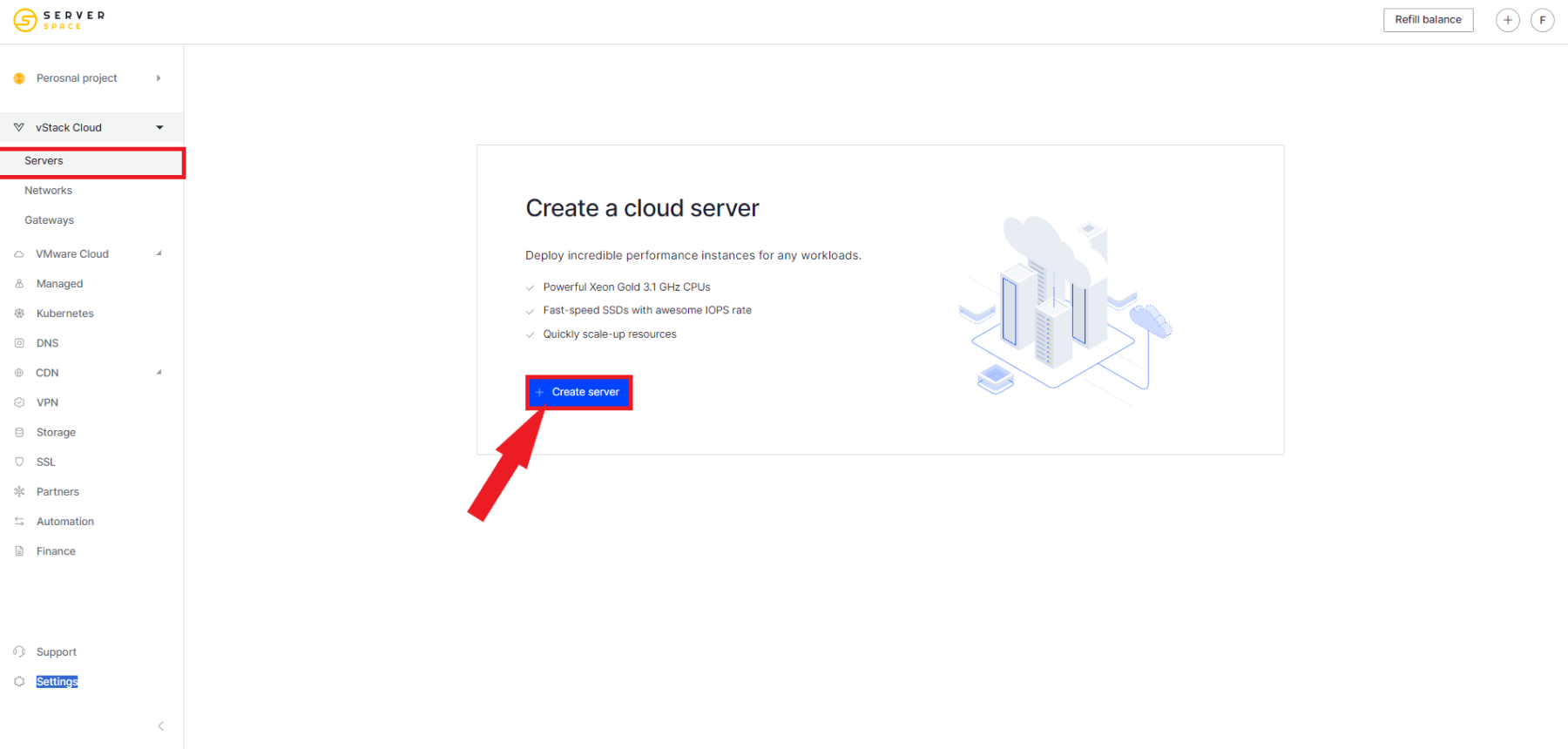
Log in to the Serverspace control panel and click Create server.
Step 2. Open the Applications catalog
During the operating system selection step, switch to the Applications tab.
From the list of available applications, select MariaDB.

Step 3. Configure the virtual machine
Set the required server parameters:
- deployment region;
- number of vCPUs;
- amount of RAM;
- NVMe disk size;
- virtual machine name.
For most web projects, a configuration with 2 vCPUs and 2–4 GB of RAM is sufficient.
Step 4. Launch server creation
After confirmation, :contentReference[oaicite:1]{index=1} will automatically:
- deploy Ubuntu;
- install the latest stable version of MariaDB;
- configure required services;
- start the database server.
The entire process usually takes only a few minutes.
Step 5. Connect to the server
After installation is complete, connect via SSH:
ssh root@YOUR_SERVER_IPCheck the MariaDB service status:
sudo systemctl status mariadbIf the installation was successful, you should see:
active (running)Verifying MariaDB
Connect to the database server:
sudo mariadbOr:
sudo mysqlCheck the installed version:
SELECT VERSION();You can also verify that the database is responding:
SHOW DATABASES;If the system databases are displayed, MariaDB is ready for further configuration.
Useful MariaDB Management Commands
| Action | Command |
|---|---|
| Start server | sudo systemctl start mariadb |
| Stop server | sudo systemctl stop mariadb |
| Restart server | sudo systemctl restart mariadb |
| Check status | sudo systemctl status mariadb |
| View logs | sudo journalctl -u mariadb -f |
Security Recommendations
- Set a strong password for the database administrator.
- Remove anonymous users.
- Disable remote root login.
- Delete the test database.
- Allow access only from trusted IP addresses.
- Regularly update MariaDB and the operating system.
Common Issues
Cannot connect to MariaDB
Make sure the service is running:
sudo systemctl status mariadbPort 3306 is not accessible
Check firewall rules and server network settings.
Access denied error
Verify the username, password, and user privileges.
When to Choose MariaDB
| Task | Is MariaDB Suitable? |
|---|---|
| Web applications | Yes |
| CMS (WordPress, etc.) | Yes |
| CRM and ERP | Yes |
| Transactional systems | Yes |
| High-load analytics | Partially (ClickHouse is better suited) |
FAQ
What is the difference between MariaDB and MySQL?
MariaDB is a fully compatible open-source fork of MySQL, actively developed by the community with additional performance and optimization features.
Can MariaDB be used with WordPress?
Yes. WordPress officially supports MariaDB, and many modern hosting providers use it as the default database engine.
Do I need to install MariaDB manually?
No. In the Serverspace panel, MariaDB is available as a One-Click App and is installed automatically when creating a virtual server.
Is MariaDB suitable for commercial projects?
Yes. MariaDB is widely used in both small web projects and large enterprise systems.
Deploy MariaDB in Minutes with Serverspace
Using the One-Click Apps catalog, you can launch a fully configured MariaDB server in just a few minutes without manual installation or setup.
- Automatic installation.
- Latest stable MariaDB version.
- High-performance NVMe storage.
- Hourly billing.
- Easy resource scaling without data migration.
- Global data center locations.
After deployment, the database is fully ready for configuration and use.
Conclusion
MariaDB remains one of the most popular relational database systems thanks to its high performance, MySQL compatibility, and ease of administration. It is suitable for both small websites and large enterprise applications.
Using One-Click Apps in the Serverspace panel allows you to deploy a fully working MariaDB server in just a few minutes and start building applications immediately.



