
ClickHouse is a high-performance column-oriented database management system (DBMS) designed for processing analytical queries over massive volumes of data. Unlike traditional relational databases, ClickHouse is optimized for fast data reading and aggregation, making it an excellent choice for analytics systems, monitoring, log processing, and business reporting.
ClickHouse is widely used by companies that need to analyze billions of records in near real time. Thanks to columnar data storage, high compression rates, and support for parallel query processing, it can perform complex analytical operations significantly faster than classic DBMS solutions.
Where ClickHouse is used
- Web analytics and user behavior analysis systems.
- Application and server log storage and analysis.
- Infrastructure monitoring and telemetry processing.
- BI systems and interactive analytics dashboards.
- Financial analytics and large-scale data processing.
- IoT device event analysis.
Why use ClickHouse
- High speed of analytical SQL query execution.
- Efficient storage of large data volumes thanks to columnar architecture.
- Support for standard SQL with minimal modifications.
- Built-in replication and horizontal scaling.
- High data compression rates.
- Suitable for processing billions of rows without significant performance loss.
Minimum requirements
- 2 vCPU.
- 4 GB of RAM.
- 20 GB NVMe SSD.
- Ubuntu 22.04 or Ubuntu 24.04.
Important: ClickHouse uses the following default ports:
- 8123/TCP — HTTP API.
- 9000/TCP — Native TCP protocol.
- 9009/TCP — Inter-server communication (replication).
Installing ClickHouse via the Serverspace panel
One of the easiest ways to deploy ClickHouse is by using the One-Click Apps catalog in the Serverspace control panel. The entire process takes only a few minutes and does not require manual installation or database configuration.
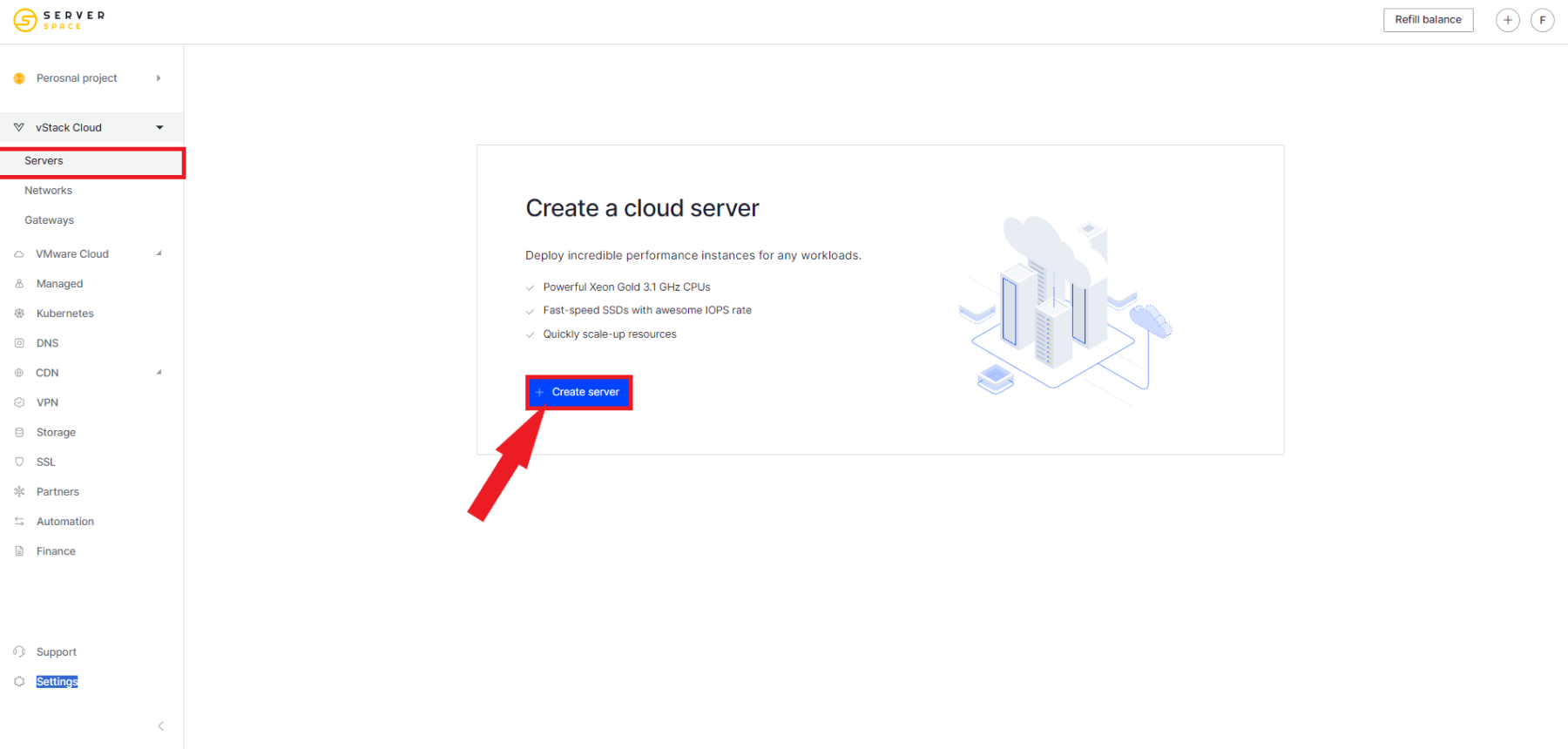
Step 1. Create a new cloud server
Log in to the Serverspace control panel and click Create server.
Step 2. Select the Applications section
At the operating system selection step, open the Applications tab.
In the list of available applications, find ClickHouse:

Step 3. Configure server parameters
Select the required virtual machine specifications:
- deployment region;
- number of vCPUs;
- amount of RAM;
- NVMe disk size;
- server name.
For most small projects, a server with 2 vCPU and 4 GB RAM is sufficient.
Step 4. Wait for installation to complete
After confirming the VM creation, the platform will automatically:
- deploy Ubuntu;
- install the latest stable version of ClickHouse;
- configure required services;
- start the database server.
Installation usually takes 2 to 5 minutes.
Step 5. Connect to the server
After installation is complete, connect via SSH:
ssh root@YOUR_SERVER_IPCheck that the service is running successfully:
sudo systemctl status clickhouse-serverIf the service is active, you will see:
active (running)Checking ClickHouse operation
Launch the built-in client:
clickhouse-clientAfter connecting, run a test query:
SELECT version();If ClickHouse is installed correctly, the server will return the installed version number.
You can also test it with another query:
SELECT now();It returns the current server date and time.
Useful ClickHouse management commands
| Action | Command |
|---|---|
| Start server | sudo systemctl start clickhouse-server |
| Stop server | sudo systemctl stop clickhouse-server |
| Restart | sudo systemctl restart clickhouse-server |
| Check status | sudo systemctl status clickhouse-server |
| View logs | sudo journalctl -u clickhouse-server -f |
Security recommendations
- Open only necessary network ports.
- Configure users and access rights instead of using the default user.
- Regularly update the operating system and ClickHouse.
- Use data backups.
- Restrict database access by IP using a firewall.
- When exposing the HTTP API, use HTTPS and a reverse proxy.
Common issues
Cannot connect via clickhouse-client
Ensure the service is running:
sudo systemctl status clickhouse-serverPort 9000 is unreachable
Check firewall settings and ensure the port is open for required clients.
HTTP API is not responding
Check port 8123 availability:
curl http://localhost:8123/pingIf the server is working correctly, it will return:
Ok.When to choose ClickHouse
| Task | Is ClickHouse suitable? |
|---|---|
| Business analytics | Yes |
| Log processing | Yes |
| Infrastructure monitoring | Yes |
| OLTP workload with many UPDATE operations | No |
| High-speed real-time analytics | Yes |
FAQ
What is ClickHouse used for?
ClickHouse is designed for storing and fast analysis of large volumes of data. It is commonly used for analytics, monitoring, log processing, and BI reporting.
Can ClickHouse be used as a regular relational database?
It can, but ClickHouse was primarily designed for analytical workloads (OLAP), not transactional workloads (OLTP).
Do I need to install ClickHouse manually?
No. In the Serverspace panel, ClickHouse is available as a One-Click App and is installed automatically when creating a server.
Which languages does ClickHouse support?
ClickHouse uses an SQL-like query language and integrates with most modern BI tools, programming languages, and ETL systems.
Deploy ClickHouse in minutes with Serverspace
Using the One-Click Apps catalog in the Serverspace control panel, you can get a fully ready ClickHouse server without manual installation.
- Automatic installation.
- Latest stable ClickHouse version.
- High-performance NVMe storage.
- Hourly billing.
- Easy resource scaling in a few clicks.
- Data centers in multiple global regions.
Conclusion
ClickHouse is one of the fastest analytical DBMS systems available today. Thanks to its columnar architecture, high performance, and SQL support, it is an excellent choice for log storage, telemetry, business analytics, and large-scale data processing.
Using the ClickHouse One-Click App in the Serverspace panel allows you to deploy a fully configured server in just a few minutes, eliminating the need for manual installation and initial setup.



